8/19/2011 in Life Online by micah
I just read The five year lag, a good post about church and technology by @wezlo. While this wasn't his main point, a bit of what he said jumped out at me because it's been on my mind this week. I had to move back a couple of paragraphs to find the connecting statement, because - honestly - I'd skimmed right past it.
We are seeing a significant social shift in the ways people connect with each other that is literally re-mapping our brains. It also further blurs the line between 'urgent' and 'important' because all of our data seems to demand immediate attention.
read more
3/23/2011 in Life Online by micah
The success of a website is often measured by how frequently users do what you want them to do. A lot of UX design effort goes into making it easy for them to do things right, but how often do we design so that users can do no wrong? This morning, I discovered that Kroger has applied this principle in a very effective way.
read more
10/8/2010 in Life Online by micah
I was recently asked about using issuu.com as a tool for publishing print media on the web. While I found only a couple of minor things I didn't like about Issuu, mostly regarding zoom control, this question roused my general dislike for the practice of dumping printed material to a PDF file and slapping it on a website.
read more
11/24/2008 in Tech Arts by micah
Tonight's rehearsal of our annual musical drama, A Christmas Tale, was a night of different perspectives. I wasn't really thinking when I snapped this photo with my cell phone, but it fits.
When we started out tonight, neither of my lighting guys were there, so I stuck my teenage daughter on the light board, where she did a great job of being mature and attentive, following cues without error. She worked backstage last year, so she saw a new perspective on how lighting tied in to the portions of the show where she'd had to move props on- and off-stage in the dark last year.
read more
10/31/2008 in Life Online by micah
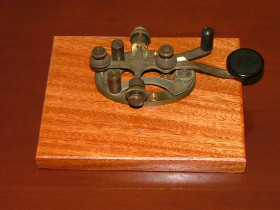
It's sometimes hard to remember that "instant" text messaging has been around for a long time, and that text messaging is far older than voice technology for long distance communication. The difference today is that text messaging devices are wireless, and don't require intensive training and study to be used.
My great-grandfather, Rush Webner, was a telegrapher for various railroads, including a 36 year stint as agent-operator for the Wheeling and Lake Erie station in Smithville, Ohio.
read more
7/3/2008 in Life Online by micah
There's a lot of talk about version numbers and the web these days. It seems that people are getting tired of talking about Web 2.0, and want to move on to new versions. I've started wondering if the whole bit about numbering web versions is keeping us from seeing how short-sighted our vision actually is.
read more